Cloud networking
AWS Two-Tier Networking
A Terraform deployment that separates a public frontend from a private API host.
By Himan MandujaSource reviewed Reviewed commit a0c3912 ↗
On this page
This AWS lab is deliberately small enough to trace end to end. A public EC2 instance serves a Next.js frontend, while a second EC2 instance runs FastAPI in a private subnet. Terraform defines their network and the security-group relationship between them.
The central lesson is that a browser does not need direct access to the backend machine. The frontend server can act as the bridge to a private API, while AWS routes and security groups define how that traffic is allowed to move.
A small, inspectable network boundary
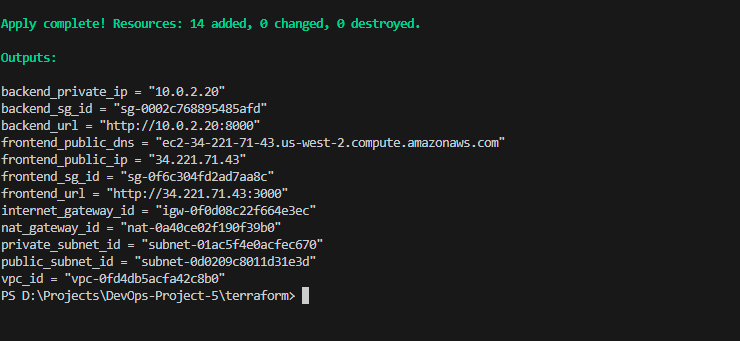
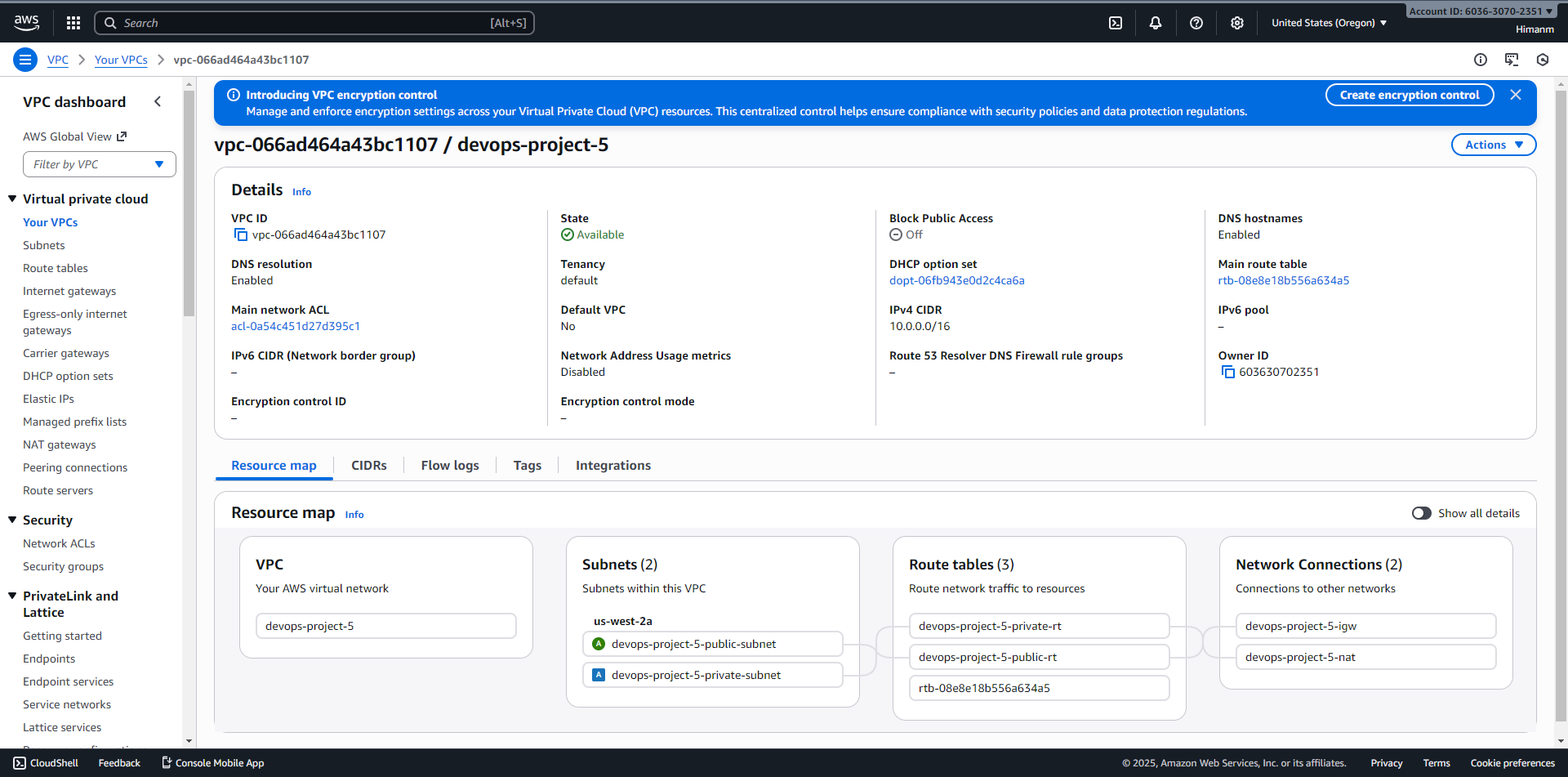
The Terraform configuration defines a 10.0.0.0/16 VPC in us-west-2. Public subnet 10.0.1.0/24 and private subnet 10.0.2.0/24 both sit in us-west-2a.
The frontend uses a t2.small instance with public access. The backend uses a t2.micro and a fixed private address. Its security group accepts port 8000 from the frontend security group, rather than from all internet addresses. That source-group rule is the key application-tier boundary.
Following the private API call
A visitor reaches the frontend’s public address on port 3000. The Next.js API route then calls the private backend address. FastAPI exposes /api/hello on port 8000 and returns the response through that server-side proxy.
This is different from putting the backend’s private IP directly into browser JavaScript and expecting a visitor’s laptop to route to it. The frontend host has network access inside the VPC; the browser does not. That distinction makes this a useful networking exercise even though the application endpoint itself is simple.
Bootstrapping the two machines
EC2 user-data scripts clone the repository and install the applications. The backend bootstrap creates a systemd service running Uvicorn on 0.0.0.0:8000. The frontend bootstrap installs and starts the Next.js application with the backend address available to it.
This captures machine setup alongside resource creation, but also couples provisioning to external package downloads and the repository’s contents at bootstrap time. There is no separate immutable-image release mechanism here. Reproducibility would improve with explicit version references and a defined application-update path.
Why the private subnet needs egress
The public subnet routes through an Internet Gateway. The private subnet uses a NAT Gateway in the public subnet for outbound traffic. That lets the backend install dependencies or initiate external connections without assigning it a public IP.
NAT is an outbound path, not an inbound exposure mechanism. Application ingress still follows the frontend-to-backend security-group rule. The distinction between route tables and allowed inbound traffic is one of the most useful parts of this lab.
Evidence and the limits of the design
The repository includes Terraform plan/apply outputs, AWS-console screenshots, and the frontend’s connectivity-test interface. The interface screenshot alone does not establish a successful API response. The separate GitHub Pages workflow builds a static documentation/demo version and removes the API route before export. Its public domain should therefore not be mistaken for proof that the EC2 pair is currently running.
The design has one availability zone and one machine per tier. It does not implement high availability, even though the README uses broader availability language. The frontend security group also permits SSH from any IP and publishes the application directly on port 3000.
For a stronger deployment, the next changes would be restricted administrative access, a defined TLS/load-balancer entry point, independent release artifacts, and a deliberate redundancy plan. Those are extensions to this educational segmentation lab, not properties already established by it.
Source files
- Terraform resourcesInstances, subnets, routes, NAT, and security groups.
- Backend bootstrapApplication installation and systemd startup.
- Frontend API proxyHow the public tier reaches the private API.
- Documentation deploymentWhy the Pages site is separate from the AWS runtime.